
Custom terminal programmes
OEM & ODM Intelligent Terminal Manufacturing
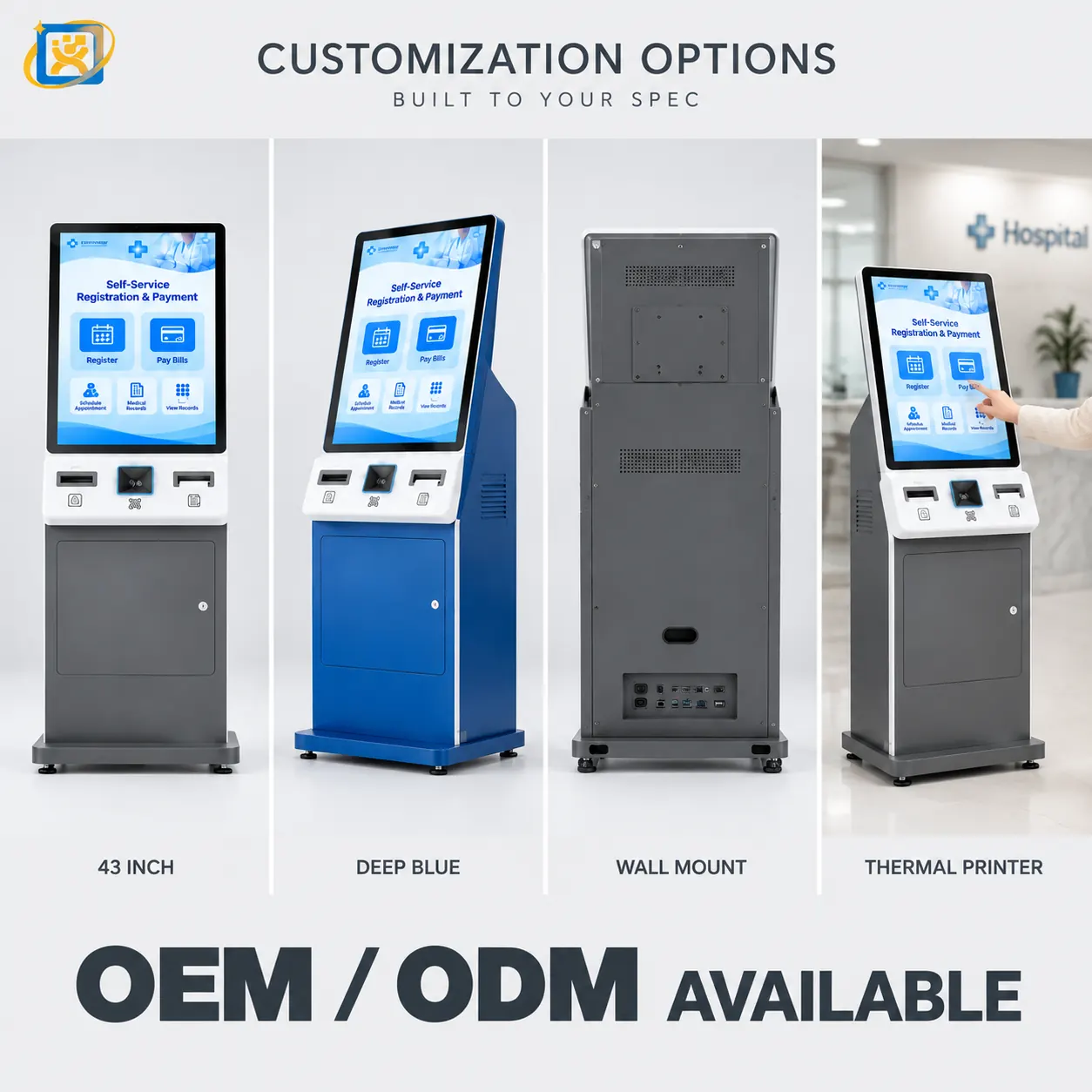
Build to your drawing or adapt an existing platform to your requirement. Dimensions, structure, colour, logo, configuration, hardware, software integration, interface layout and packaging are all within scope.
OEM or ODM — which one fits
OEM means we build to your design. You bring the housing design, the configuration and the branding; we manufacture it. This is the usual route for a buyer who already has a product in the market, or who has an industrial designer engaged and wants a manufacturing partner rather than a design partner.
ODM means we adapt an existing platform to your requirement. You describe what the terminal has to do and where it has to fit; we propose a platform and the changes needed. It is faster and less expensive than a full design, and it is what most buyers choose when the housing shape is not itself the differentiator.
In practice many projects sit between the two: a standard platform with a new front panel, a different colour, a specific peripheral combination and the buyer’s branding. That is a normal and efficient arrangement.
What can be customised
Almost everything except the fact that it has to work.
- Dimensions and structure — overall size, aspect ratio, cabinet structure, mounting method and service access direction.
- Colour and finish — housing colour, surface finish and material selection.
- Logo and branding — silk-screen, badge or backlit logo, plus branded packaging and documentation.
- Hardware configuration — screen, mainboard, memory, storage, power supply, cooling and peripheral modules.
- Interface and I/O layout — port positions and cut-outs for scanners, printers, card readers and cameras.
- Software and system integration — operating system image, drivers, autostart behaviour and integration with your application or platform.
- Interface integration — protocol and driver support for third-party modules used in your deployment.
- Packaging — export cartons, foam protection, palletisation, and retail or project-delivery packaging.
The details that decide whether a project runs smoothly
Experience says the risk in a custom terminal project is rarely the big decision. It is the small one that gets deferred:
Where does the cable exit? A floor-standing unit cabled from the rear and a counter-top unit cabled from below need different housings. Deciding this after production means a change order.
Which direction does the service access open? A terminal against a wall cannot be serviced from behind. A unit in a corner cannot be serviced from the side. This determines the enclosure, and it depends on the site.
Where do the cut-outs sit? Peripheral positions affect reachability, glare and the internal layout. Confirming them on a drawing is inexpensive; changing them on a production unit is not.
What exactly runs at start-up? The operating system image, the driver set and the autostart behaviour are part of the build. Specifying them at the factory removes commissioning work at every site.
We settle all four during configuration confirmation, which is why that stage exists as a separate step rather than as part of the quotation.
Prototype before production
For any project involving a housing change, a prototype is produced and signed off before mass production is committed. The prototype proves the physical fit, the peripheral positions and the software behaviour. Where your software vendor needs to validate the platform, the prototype is the unit they validate on.
Confidentiality
Drawings, specifications and software details you share are used only to quote and produce your order. We sign an NDA on request before technical documents change hands, and we do not resell a customer’s custom housing design to other buyers.
What to send us
Whatever you have is enough to start. The most useful items are:
- The application and the workflow the terminal sits in.
- Screen size preference, or the viewing distance if you are unsure.
- The peripherals required, and the software the unit must run.
- Quantity for the pilot and for the rollout.
- Destination country and any certification requirement.
Send those and we will come back with a platform proposal, a configuration outline, a lead time and a price.
Working process
From requirement analysis to remote technical support
Each stage has a defined output you sign off before the next one starts — so nothing is committed to tooling or mass production before it is agreed.
- 01
Requirement analysis
We start with the application, the software environment, the deployment site and the quantity. A drawing, a photo of an existing unit or a written description is enough to begin. The output of this stage is a shared understanding of what the unit has to do.
- 02
Solution design
We propose a platform and a configuration — enclosure, screen, computing, peripherals, interfaces and mounting. Where the requirement does not fit an existing platform, this stage identifies what would have to change.
- 03
Configuration confirmation
Every detail is fixed in writing before anything is built: dimensions, colour, branding, cut-out positions, interface layout, cable exit, service access, operating system image and driver set. This is the document the production build is inspected against.
- 04
Prototype
A prototype unit is produced for functional sign-off. For projects involving a housing change this is where the physical fit is proven — before tooling or mass production is committed.
- 05
Testing
The prototype runs the full function test against the agreed configuration, and where relevant is validated against your software. Nothing proceeds until the prototype and the configuration are signed off.
- 06
Mass production
Production runs against the confirmed configuration, with in-process inspection at each stage rather than a single check at the end.
- 07
Quality inspection
Four gates — incoming, in-process, complete-machine functional and final inspection. Records are kept against the unit and are available to the buyer.
- 08
Delivery
Export packaging, documentation and shipping coordination, with delivery staged against a project schedule where the rollout requires it.
- 09
Remote technical support
After shipment, remote technical diagnosis and repair guidance for the 3-year warranty period, with spare-part supply and return-to-factory service where remote support is not sufficient.
Scope
What can be customised
Most OEM/ODM projects combine several of these. Send whatever you have — a sketch, a drawing or a photo of an existing unit is enough to start.
Dimensions & structure
Overall size, aspect ratio, cabinet structure, mounting method and service access.
Colour & finish
Housing colour, surface finish and material selection to match your brand or the installation environment.
Logo & branding
Silk-screen, badge or backlit logo, plus branded packaging and documentation.
Hardware configuration
Screen, mainboard, memory, storage, power supply, cooling and peripheral modules.
Interface & I/O layout
Port positions, cut-outs for scanners, printers, card readers and cameras.
Software & system integration
OS image, drivers, autostart behaviour and integration with your application or HIS/LIS platform.
Interface integration
Protocol and driver support for third-party modules used in your deployment.
Packaging
Export cartons, foam protection, palletisation and retail or project-delivery packaging.
How we handle your design
Drawings, specifications and software details you share are used only to quote and produce your order. We sign an NDA on request before technical documents change hands, and we do not resell a customer's custom housing design to other buyers.
At a glance
Programme parameters
Sample lead time
7–14 days
Mass production
20–35 days
Warranty
3 years
NDA
Available on request
Send your OEM / ODM requirement
Attach a description of the target unit, the quantity you expect and the destination market. Our engineering team will assess feasibility and reply within one business day.
Not sure whether your project is OEM or ODM?
OEM means we build to your design; ODM means we adapt an existing platform to your requirement. Either way, the first step is the same conversation.